
Accessibility at the AOSS Library
This page contains accessibility information specific to the AOSS Library. For general accessibility information about all UW-Madison Libraries, see Accessibility.
Contact information
For accessibility questions for this library, please call (608) 262-0987 or email library@ssec.wisc.edu. If you need a resource or accommodation that is not listed on this page, please email accommodation-request@library.wisc.edu
Accessing the Library
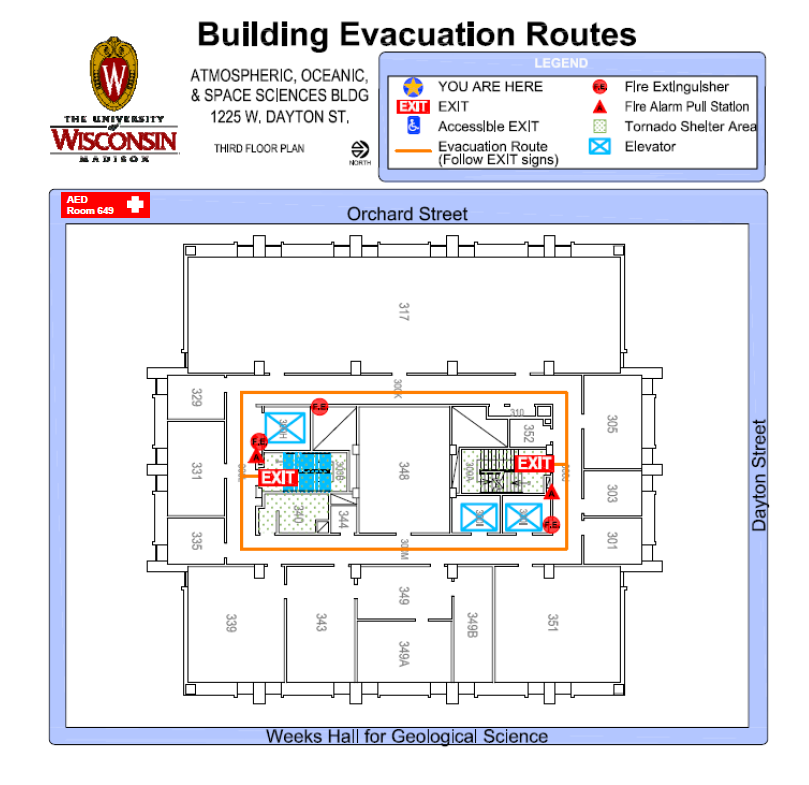
Building Map
Entrances
- Entrance and exit available on the east side of the building, facing Charter Street and the Geology Building.
- If coming from Charter Street direction, sidewalk is level with the entrance and exit doors.
- If coming from Orchard Street direction, continue on the main sidewalk past the stairs on Orchard Street to go up the hill on the sidewalk along Dayton Street and reach area where sidewalk is level with doors.
- The rightmost of the three doors has an automated entry paddle.
- Campus accessible entrance list
- Once inside the building, the AOSS Library is on the 3rd floor, in room 317. After exiting the elevators, turn left twice and then look along the right side wall for the library entrance.
- When the library is open, the doors are open and do not require any door mechanism for entry.
Elevators
- There are two public elevators in the main lobby, which can be found after entering through the east entrance. They will be directly in front of you once inside.
Parking & Transportation
- The 80 bus stops right outside the building on Dayton Street. The D and O bus routes stop at the corner of Dayton and Randall, about a block away. The A, F, C, and J routes stop on University (westbound, 2 blocks away) and Johnson (eastbound, 1 block away).
- The closest visitor parking is at the Union South garage, just across Dayton Street.
- Campus accessible parking stall list and map
Emergency / Evacuation Procedures
- In case of an emergency, exit through either of the two stairwells and proceed to Union South. Do not use the elevator.
- If you cannot self-evacuate for any reason, shelter in place. Dial 911 and state your location. UW Police dispatchers will relay this information to first responders.
Interior Space Accessibility
Reservable Study Rooms and Spaces
- The AOSS Library has a reservable classroom area on the south side of the library. It is not an enclosed space. Please email library@ssec.wisc.edu to make a reservation.
Quiet Spaces
- The AOSS Library is often fairly quiet due to low visitation. However, it is not a designated quiet space and is only one room, so noise levels vary day-by-day.
Restrooms
- All bathrooms are outside of the library space but within the same building. The closest men’s bathroom is on the 4th floor, the closest women’s bathroom is on the 3rd floor (the same floor as the library), and the closest gender-neutral bathroom is on the 2nd floor.
- The bathrooms on the 1st and 2nd floor are accessible and have automated entry paddles.
Lactation Space
- There is a wellness room on the 3rd floor that can be accessed with a building key. Ask at the library front desk if you need to use this room.
Lighting
- The library uses energy saving lights. If no one has moved in a room for a certain amount of time, all but emergency lights will turn off. The lights will flicker once as they turn back on.
- All tables in the north part of the library have lamps on them.
Technology
The AOSS Library has one public access computer and one printer kiosk, as well as one black-and-white printer.
- The public access computer and printer kiosk are on a desk at a wheelchair-accessible height.
- The printer is on the ground.
Services
Accessing Materials and Services
- The library front desk is at a wheelchair-accessible height.
- Please ask at the front desk if you have questions or need help accessing any materials or services.